Showing posts with label Baby Card. Show all posts

Monday, February 24, 2025

Baby Dresser Cards

 Hello Crafty Friends, today I want to share with you some sweet baby cards I made.


First I created the Baby Dresser Card for a boy (SVGSilhouette). 


I then decided that I loved it so much that I would make a girl version of the card. To do this I changed the little boys romper in the file to the dress from the Baby Girl Dress Card (SVGSilhouette). To get the size I simply pasted the file on the same page & used the original romper as a guide.


Supplies:
Paper: AC Cardstock
SVG File: Lori Whitlock - Baby Dresser Card (SVGSilhouette)
Baby Girl Dress Card (SVGSilhouette)
Accessories: Doodlebug Design Gold Sprinkles & pearl stickers from my stash.

For more inspiration, check out my Instagram!

Thanks for stopping by!

Hugs

Noelene :)   

Thursday, September 26, 2024

Baby Bottle Shaped Shaker Card

 Hello Crafty friends, today I want to share how I made this adorable Baby shaker card!

The file for my project today is the Baby Bottle Shaped Card (SVGSilhouette).


I opened my file in Silhouette studio & took the bottle panel of my file, (coloured in white in my pic), & made a copy so that I now have 2. 


One will be used to create a frame for my shaker by making an internal offset & the other I will use to cut a sheet of acetate for the shaker window.


I created an internal offset of 0.450 on one of them. You can now put the other, (for the acetate), without the offset to the side. I have slightly enlarged my card so the offset measurements may vary depending on the size of your card. I just kept playing with mine till I got it to the desired size.
 

 I then copy & pasted this to fill my page. I was able to fit 4 in total. I cut out 12 pieces of this panel. These are to create the frame for your shaker. You only keep the outside frame. The insert is not needed. You will only need to cut 1 frame if you prefer to create the window frame with foam tape. I prefer this way as I find them much sturdier. I then cut out another of the same panel using the printed paper to make the top printed panel. This time keep both the frame & inside cut. Once I cut out all my pieces the first step was to glue the frame together by layering carefully my 12 pieces. 


How thick the layer will depend on the type of shaker confetti you use inside. My shaker balls where a little raised & I wanted them to move freely in my card.


Next I glued together my top panels onto the front of my bottle panel & also glued down the shaker frame I created onto the bottom part.


I wanted some embellishments as well as sprinkles in my card, so I adhered some cute stickers on the inside panel first. 


Once my stickers were in place I took the panel & glued it inside my frame. This should fit perfectly. Then I added my tiny balls. You can use any sprinkles in your stash. I wanted mine to look like milk inside the bottle that is why I chose the white balls. Next I gave my acetate a light brush of powder on the side I was going to glue down so that it is not static. I then glued the acetate to the frame. I let it dry before the next steps. Acetate takes a little longe to dry & not so instant as paper. Once the acetate was dry I glued on top the printed panel frame. Lastly I glued down my complete bottle panel onto the front of the card frame.


I added a sticker with sentiment on top to finish off!


Supplies:
Paper: Doodlebug Design - Bundle of Joy
SVG File: Lori Whitlock - Baby Bottle Shaped Card (SVGSilhouette).
Accessories: Doodlebug Design Shakers - Lily White Balls & stickers.

For more inspiration, check out my Instagram!

Thanks for stopping by!

Hugs

Noelene :)  

Thursday, August 8, 2024

Baby Girl Dress Card

   Hello Crafty friends, today I want to share how I made this adorable Baby Girl Dress card (SVGSilhouette).

I wanted to enlarge the card so I enlarged all my pieces at the same time by dragging the curser until the base of the dress card was large enough & fit inside the cutting perimeter. This will give me a card that will fit into a 6x6 envelope.


  I wanted to have a strawberry theme so I took some elements from the Lori Whitlock Strawberry Basket with Strawberry file (SVGSilhouette). To get a visual I dragged them onto my dress. I kept the strawberry & flower the original size then reduced the vine to fit.


 I also reduced 1 more flower & cut it twice to create the buttons.


I like to make an insert for my cards. I find this also helps to keep my card a little sturdier considering there are more layers on the front. To do this I created an internal offset distance of 0.125 applying the sharp corner. 


I then cut out all of my pieces & glued all my panels into place. 


This card was so easy & fast to put together! Even with the extra strawberry elements.


I hope you liked my card today.


Supplies:
Paper: Doodlebug Design - Petite Prints
SVG File: Lori Whitlock - Baby Girl Dress card (SVGSilhouette)
SVG File: Lori Whitlock - Strawberry Basket with Strawberry file (SVGSilhouette)
Accessories: Doodlebug Design Sprinkles

For more inspiration, check out my Instagram!

Thanks for stopping by!

Hugs

Noelene :)  


Monday, July 15, 2024

Tool Themed Baby Boy Overall Card

  Hello Crafty friends, as you may recall, last week I created a Baby Themed Lion Overall card for the Lori Whitlock blog hop! I had so much positive feedback that I even got a request to create another with a different theme for a little boy's 2nd Birthday! Therefore for my project today I want to share with you the same Baby Boy Overall Card file (SVGSilhouette), in a different theme. 

The recipient loves anything to do with vehicles & tools just like his Daddy, so I came up with the idea of adding the tools from the Tool Box Father's Day A2 card file (SVGSilhouette).


I enlarged the shirt, overalls, shoulders straps & a pocket from the overall file enough that the shirt fit fully on the page in my Silhouette program. For this card you can see I have only used one of the pockets & placed it in the centre. By enlarging my card just a little it allows more space for my tools to be placed without looking crammed. This creates a card approx 4 5/8 x 5 7/8. I will use a 5x7 envelope. 


Next I drew white stitches using a white gelly roll no.10 marker. Then I glued my overall elements except for the pocket. I then cut & put together my tools from the Toolbox Fathers Day card. I used some silver metallic cardstock as well to make them look more realistic. I did not alter the size of the tools & used the original sizes. 


I then carefully arranged my tools using the pocket as a guide before glueing everything down. I did have to snip some of the tools from the bottom so that they sat better & didn't overlap creating a bulky look in the pocket.


I finished off by glueing some buttons from my stash & adding a black enamel dot to the pliers.


I love how this turned out! I hope I have inspired you to give this a try & would love to see what other Lori Whitlock files you can combine for your creations using the Baby Boy Overall card. 

Supplies:
Paper: Doodlebug Design - Petite Prints
SVG File: Lori Whitlock - Baby Boy Overall Card (SVGSilhouette)
SVG File: Tool Box Father's Day A2 Card - (SVGSilhouette)
Accessories: Doodlebug Design Sprinkles, Buttons.

For more inspiration, check out my Instagram!

Thanks for stopping by!

Hugs

Noelene :)  

Tuesday, July 9, 2024

Lion Themed Baby Boy Overall Card - July Blog Hop with Lori Whitlock


Hello friends! Welcome to the Lori Whitlock July Blog Hop!


Today I have a cute overall card to share with you. I started off with the A2 Baby Boy Overall Card (SVG, Silhouette). I wanted to make it a Lion theme so I have combined a couple of Lori Whitlock files. The lion is from the Father's Day Safari Jeep Box Card file (SVGSilhouette) & the Rainbow & Heart are from the Envelope Rainbow & Hearts Box Card files (SVG, Silhouette), (SVG, Silhouette).


I reduced to size my lion & rainbow. Then adhered to my overalls. I finished off by using some buttons I found in my stash to embellish.


Don't forget the sale!


Be sure to enter the giveaway!


 For more fun projects & inspiration today from the Creative Team make sure you hop along to each blog! That's all from me today, your next stop on the hop is Tamara's blog

Thanks for stopping by!

For more inspiration, check out my Instagram!

Hugs

Noelene x

Friday, May 10, 2024

Animal Parade

Hello Crafty Friends, today I have a baby card to show you using a digital image from RAM Stamps called Animal Parade.  


My card today was simple to make. I created my card on a 5"x7" base. I cropped the bear from the rest of the image & printed then cut to size. I then shaded the background with some splaters.  Lastly I added the die cut sentiment & some shaped sprinkles to embellish.


Copics:
Bird: Y00, Y02, Y04, YG15
Drum: BG10, BG10, C30, RV02, RV04
Bear: YG13, YG11


Animal Parade is available here.


Use coupon code NOELENE for 10% off your purchase!


Supplies:
Colouring Medium: Copics
Distress Oxide - Salvaged Patina
Accessories: Doodlebug Design All Occassions Dies & Sprinkles.

For more inspiration, check out my Instagram!

Thanks for stopping by!

Hugs

Noelene x


Tuesday, March 26, 2024

Goodnight Hippo

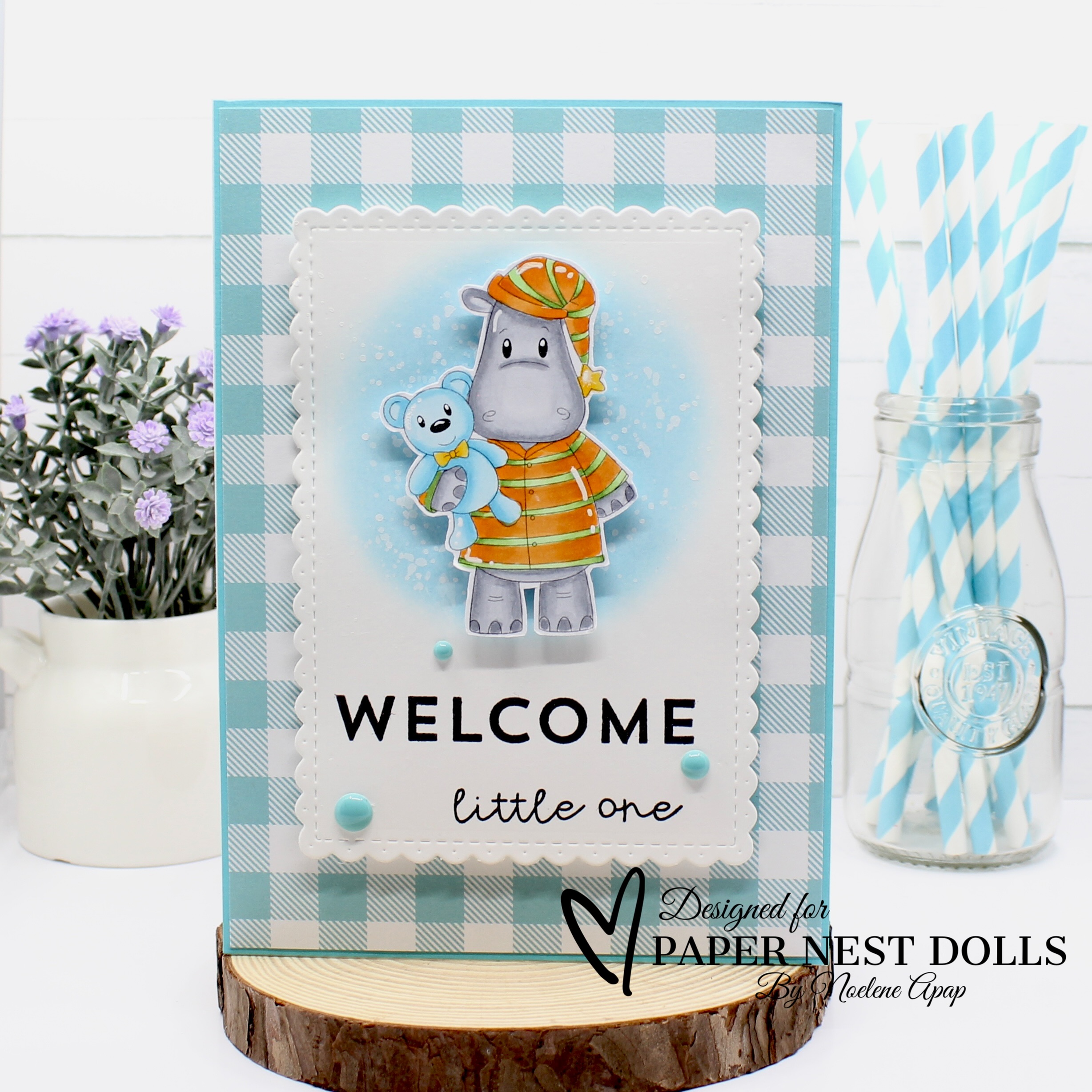
 Hello Crafty Friends, I am back today with some D.T. inspiration for the Paper Nest Dolls

Today I have a baby card to share using the adorable Goodnight Hippo stamp.


I created my card on a 5"x7" base & die cut a panel then shaded the background with some splaters. I fussy cut my image after colouring & stuck into place. Lastly I added the sentiments & some shaped sprinkles to embellish.


Copics:
Clothes: Y15, Y17, Y19, YG11, YG13, YG17, YR12, YR14, YR16
Hippo: C0, C1, C2, C3, C4
Bear: BG000, BG01, BG02


Goodnight Hippo is available in digital stamp here

Supplies:
Sentiment: Doodlebug Design - All Occasions
Distress Oxide - Tumbled Glass
Paper: Doodlebug Design - Petite Prints
Accessories: La La Land Crafts Scalloped Rectangles Die,  Doodlebug Design Sprinkles.

For more inspiration, check out my Instagram!


Thanks for stopping by!


Hugs

Noelene x

Wednesday, November 22, 2023

Ice Cream Cravings

  Hello Crafty Friends, I am back today with some D.T. inspiration for the Paper Nest Dolls

It seems lately I cannot have enough baby cards on hand! This time it was for a gender reveal. So today's card features the yummy mummy image from PND called Ice Cream Cravings.


I printed & coloured my image with Copics on some X-Press It blending paper. I created my card using layers of die cut squares onto a 6x6 base. I embellished it with some cute die cuts of baby clothes & lace & flowers to finish.


Copics:
Hair & Shoes: E41, E43, E44, E47, E49
Skin: E0000, E000, E00, E11, R20
Ice Cream: Y15, T19, E21, E23
Pants: BV00, BV01, BV02
Shirt: G000, G00, G02


Ice Cream Cravings is available in rubber here & digital stamp here


Supplies:
Paper: Doodlebug Design - Petite Prints
Sentiment: Computer Generated
X-Press It Blending Paper
Accessories: Lalaland Crafts Clothesline Banner, Spellbinders Postage Edge Square Dies, Martha Stewart Frond & Vintage Doily Punch, WOC Flowers & Lace from my stash.


For more inspiration, check out my Instagram!

Thanks for stopping by!

Hugs

Noelene x

Wednesday, August 16, 2023

Beary Awesome Day - Mini Scene Creator

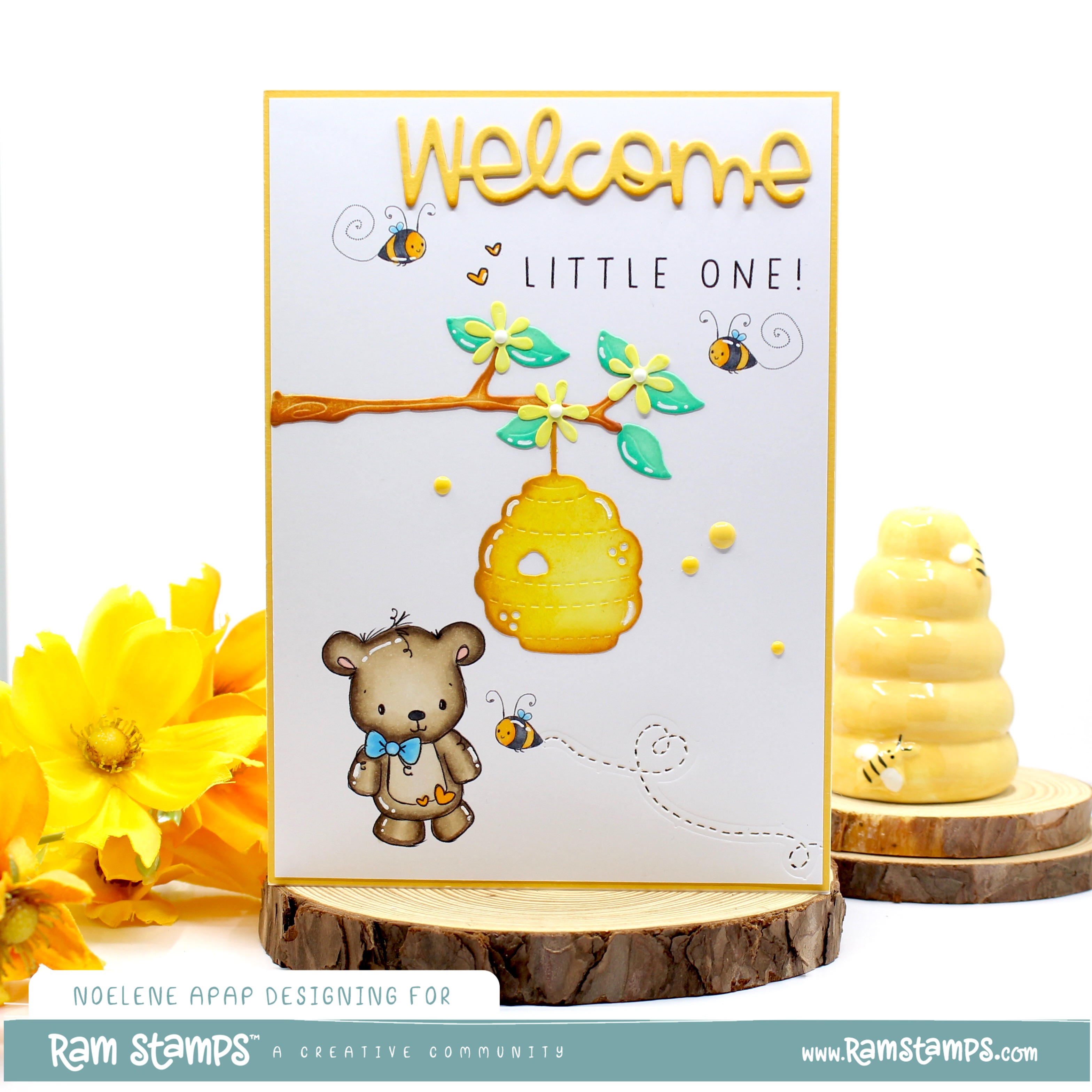
 Hello Crafty Friends, I have another card to share with you today from the new release over at  Rachelle Anne Miller Creative Studios.  The new release consists of 6 Animal Greetings mini scene creators. Each stamp can be used on its own to create a fun scene or mix them up to make a fun, interchangeable, completely different scene altogether.


 Today I have used the "Beary Awesome Day" mini scene for my card. 


I thought this image is so adorable that it would make the perfect baby card. This card was easy to make. Once I worked out the space & areas I wanted my images on, I printed the image directly on my card. I used part of the sentimenT for the word "little one" from another stamp in this collection called "Hoppy Birthday Bunny". I then shaded my die cuts & glued them down. I also used a stitched die which I thought would be a cute touch behind my little bee that leaves a heart shaped trail. Lastly I added some sprinkles to embellish. I then stuck my card face onto a 5 x 7 yellow cardstock base to create the border.


Copics:
Bear: B00, B01, B02, E40, E41, E42, E43, E44, E77, R30
Bees: Y35, Y38, C7, C8


The new release is available in store now!

"Beary Awesome Day" is available here!
 

Don't forget to check out the other new images, "Hoppy Birthday Bunny""Monkey Smiles""Ducky Thoughts""Special Day Owl", & "Koala-ty Friend" & have fun experimenting with them all! 


Want them all? Then just bundle & save 30% off here!


Rachelle Anne Miller Creative Studios is having a 24 hour flash sale! Save 30% all digital stamps with code DIGI30 Sale ends August 17th!

But if you miss the sale you can still save anytime
use coupon code NOELENE for 10% off your purchase!


Supplies:
Paper: AC Cardstock - Sunflower
Colouring Medium: Copics
Distress Ink - Squeezed Lemonade, Mustard Seed, Lucky Clover, 
Cracked Pistachio, Rusty Hinge, Wild Honey
Accessories: Magnolia Doohickey Box Vol 10,  Doodlebug Design all Occassion Doodlecuts & Sprinkles


For more inspiration, check out my Instagram!


Thanks for stopping by!


Hugs


Noelene :)