Showing posts with label SVG. Show all posts

Thursday, April 17, 2025

3D Easter Eggs

 Hello crafty friends. Today I want to share with you how I made these cute fun 3D Easter Eggs, using the following Lori Whitlock Files: 3D Easter Egg 2 (SilhouetteSVG), 3D Easter Egg 3 (SilhouetteSVG), 3D Easter Egg 4 (SilhouetteSVG), 3D Easter Egg 5 (SilhouetteSVG) &
3D Easter Egg 6 (SilhouetteSVG).


For my tutorial I am using 3D Easter Egg 4 (SilhouetteSVG). 


I started out by opening my file in Silhouette & using the transform tool to enlarge all my panels to 135%. This gave me an egg with the dimensions approx 3.5" wide x 5" high.


Then I proceeded to cut the panels using coloured cardstock for the coloured panels & vellum for the grey panels.
 

I finely glued the vellum onto the back of eacg tulip patterned panel being careful not to put too much. Now let them dry. 


Next I took the 3 egg shaped panels & insterted them into each other starting with the one with the 2 slits on top & bottom (far right on above image). Then I insterted the one with the slits on the outer edge (middle on above image) then lastly inserting the one with the slits on the inner edge, (far left on above image). 


Then I inserted the big round shape onto the bottom slits.


Doing the same with the smaller round shape on top.


Lastly take the tulip panels & insert the wider part into the bottom of the egg shape & the narrower part into the top part of the egg.


Now do the same with the remainder of the panels & you are done. If you wish you can add some light using led tealight candles for a lantern effect.


I will be using mine in my Easter table setting.


If you want to make the lot like I plan to do, (because why not! They're quick & simple to make! You can purchase these files individually or as a bundle here


Supplies:
Paper: AC Cardstock
SVG File: Lori Whitlock 
3D Easter Egg Bundle (SVG)
3D Easter Egg 2 (SilhouetteSVG)
3D Easter Egg 3 (SilhouetteSVG)
3D Easter Egg 4 (SilhouetteSVG)
 3D Easter Egg 5 (SilhouetteSVG
3D Easter Egg 6 (SilhouetteSVG)

For more inspiration, check out my Instagram!

Thanks for stopping by!

Hugs

Noelene :)  


Tuesday, April 8, 2025

Easter Card & Sheep Treat Box - April Blog Hop with Lori Whitlock


Hello friends! Welcome to the Lori Whitlock April Blog Hop!

Today I am sharing an Easter Sheep Card (SVG, Silhouette) & the Sheep Easter Egg Treat Box.(SVGSilhouette).


These are so easy & fast to make & make a cute little gift set.


Claim your free file here today only!

Don't forget the sale!


Be sure to enter the giveaway! a Rafflecopter giveaway  

For more fun projects & inspiration today from the Creative Team make sure you hop along to each blog! That's all from me today, your next stop on the hop is Tamara's blog

Thanks for stopping by!

For more inspiration, check out my Instagram!

Hugs

Noelene x  

Tuesday, March 11, 2025

3D Rainbow - March Blog Hop with Lori Whitlock


Hello friends! Welcome to the Lori Whitlock March Blog Hop!

Today I am sharing a St Patrick's Day project using the Lori Whitlock 3D Rainbow (SVGSilhouette).
This was so easy & quick to put together. Once I finished glueing together the 3D Rainbow I embellished it with some stickers from Doodlebug for a fun St Patrick's Day theme.


Claim your free file here today only!

Don't forget the sale!


Be sure to enter the giveaway! a Rafflecopter giveaway

For more fun projects & inspiration today from the Creative Team make sure you hop along to each blog! That's all from me today, your next stop on the hop is Tamara's blog

Thanks for stopping by!

For more inspiration, check out my Instagram!

Hugs

Noelene x 

Monday, February 24, 2025

Baby Dresser Cards

 Hello Crafty Friends, today I want to share with you some sweet baby cards I made.


First I created the Baby Dresser Card for a boy (SVGSilhouette). 


I then decided that I loved it so much that I would make a girl version of the card. To do this I changed the little boys romper in the file to the dress from the Baby Girl Dress Card (SVGSilhouette). To get the size I simply pasted the file on the same page & used the original romper as a guide.


Supplies:
Paper: AC Cardstock
SVG File: Lori Whitlock - Baby Dresser Card (SVGSilhouette)
Baby Girl Dress Card (SVGSilhouette)
Accessories: Doodlebug Design Gold Sprinkles & pearl stickers from my stash.

For more inspiration, check out my Instagram!

Thanks for stopping by!

Hugs

Noelene :)   

Tuesday, February 11, 2025

Valentine Bear Snowglobe


Hello friends! Welcome to the Lori Whitlock February Blog Hop!

Blog Hop Order:
Today I am sharing a Snowglobe I created using the adorable bear from the Lori Whitlock file Box Card Shopping Bag Valentine Bear (SVG, Silhouette).


I started with a 6" bauble which I purchased from a craft store. Inside my bauble I have used the Bear component of the file & added a few layers to make him sturdy. I then cut a 1" x  5" strip of cardstock & scored at 1" intervals to create a cube shape. I glued this down inside my snowglobe at the base to create a stand for my bear. Then I added some heart confetti inside my snowglobe.


For my base I cut 2 strips of paper 3" x 9" wide & glued them together to create a base 16" in circumference. Lastly I glued one of the hearts on top of my snowglobe to embellish.


Don't forget the sale!


Be sure to enter the giveaway! a Rafflecopter giveaway

For more fun projects & inspiration today from the Creative Team make sure you hop along to each blog! That's all from me today!

Thanks for stopping by!

For more inspiration, check out my Instagram!

Hugs

Noelene :)

Thursday, January 30, 2025

Valentine Birdhouse

Hello Crafty Friends, today I want to share a Valentine themed Birdhouse I made using the Double Decker Birdhouse from the Lori Whitlock 5 Birdhouse Set (SVG)


The original file has one bird but I wanted to add another bird to make them look like love birds, so to start off with I copy & pasted the bird. Then I horizontally flipped the bird so that it was facing the original. 


I did the same with the bird on the branch, then I used the knife tool to make 2 cuts to separate the bird from the branch. I then deleted the branch & used only the bird to cut.


After cutting all my pieces on my Silhouette Cameo & put together my birds onto the branch. You will need to trim the excess branch from the back panel of the extra bird we created before glueing him onto the main branch. 


Next I took the larger part of the house which is the bottom & glued the side flaps together.


Once these were dry I proceeded to glue down the roof first by glueing down the bigger piece then following the smaller roof piece on top.


Next I took the smaller bird house & glued the side flaps together. Then I glued it down onto the bottom half of the birdhouse that we have already put together. Once this was dry I finished off by glueing the 3 roof panels starting from the largest on the bottom. 


Lastly I embellished my Birdhouse with some die cuts, stickers & paper roses.


Isn't it the sweetest!


For more inspiration, check out my Instagram!

Thanks for stopping by!

Hugs

Noelene :)  


Tuesday, December 10, 2024

Nativity Christmas Scene Decor - December Blog Hop with Lori Whitlock


Hello friends! Welcome to the Lori Whitlock December Blog Hop!

Blog Hop Order:

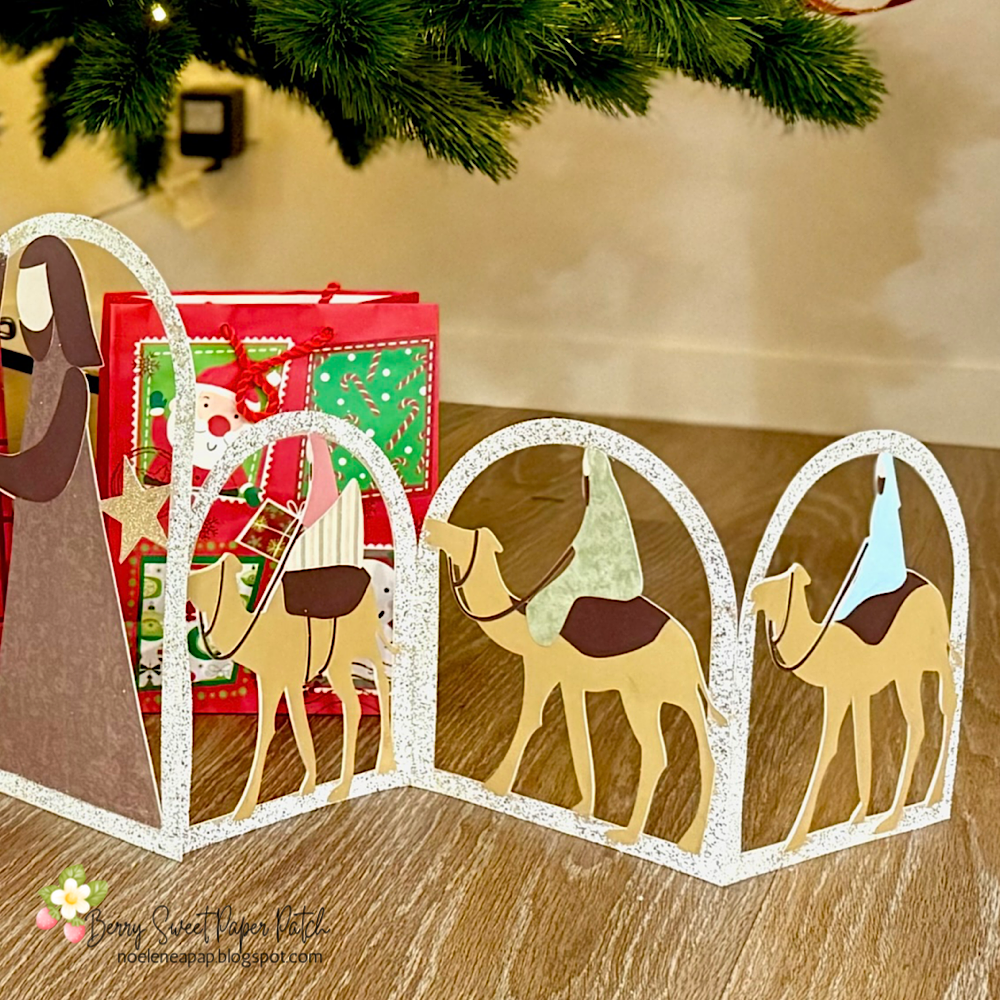
Christmas in my house wouldn't be complete if I did not have a Nativity displaying the true meaning of Christmas. Today I am using the Christmas Scene Decore Nativity Bundle from Lori Whitlock (SVG BundleSilhouette Decore Nativity, Silhouette Decor Animals, Silhouette Decor Wise Men).


This was a fun project to make. I decided to go one step further & emboss the arch frame around my nativity to make it look like stone. 


Don't forget the sale!


Be sure to enter the giveaway!a Rafflecopter giveaway

For more fun projects & inspiration today from the Creative Team make sure you hop along to each blog! That's all from me today, your next stop on the hop is Tamara's blog

Thanks for stopping by!

For more inspiration, check out my Instagram!

Hugs

Noelene x