Showing posts with label Easter. Show all posts

Thursday, April 17, 2025

3D Easter Eggs

 Hello crafty friends. Today I want to share with you how I made these cute fun 3D Easter Eggs, using the following Lori Whitlock Files: 3D Easter Egg 2 (SilhouetteSVG), 3D Easter Egg 3 (SilhouetteSVG), 3D Easter Egg 4 (SilhouetteSVG), 3D Easter Egg 5 (SilhouetteSVG) &
3D Easter Egg 6 (SilhouetteSVG).


For my tutorial I am using 3D Easter Egg 4 (SilhouetteSVG). 


I started out by opening my file in Silhouette & using the transform tool to enlarge all my panels to 135%. This gave me an egg with the dimensions approx 3.5" wide x 5" high.


Then I proceeded to cut the panels using coloured cardstock for the coloured panels & vellum for the grey panels.
 

I finely glued the vellum onto the back of eacg tulip patterned panel being careful not to put too much. Now let them dry. 


Next I took the 3 egg shaped panels & insterted them into each other starting with the one with the 2 slits on top & bottom (far right on above image). Then I insterted the one with the slits on the outer edge (middle on above image) then lastly inserting the one with the slits on the inner edge, (far left on above image). 


Then I inserted the big round shape onto the bottom slits.


Doing the same with the smaller round shape on top.


Lastly take the tulip panels & insert the wider part into the bottom of the egg shape & the narrower part into the top part of the egg.


Now do the same with the remainder of the panels & you are done. If you wish you can add some light using led tealight candles for a lantern effect.


I will be using mine in my Easter table setting.


If you want to make the lot like I plan to do, (because why not! They're quick & simple to make! You can purchase these files individually or as a bundle here


Supplies:
Paper: AC Cardstock
SVG File: Lori Whitlock 
3D Easter Egg Bundle (SVG)
3D Easter Egg 2 (SilhouetteSVG)
3D Easter Egg 3 (SilhouetteSVG)
3D Easter Egg 4 (SilhouetteSVG)
 3D Easter Egg 5 (SilhouetteSVG
3D Easter Egg 6 (SilhouetteSVG)

For more inspiration, check out my Instagram!

Thanks for stopping by!

Hugs

Noelene :)  


Tuesday, April 8, 2025

Easter Card & Sheep Treat Box - April Blog Hop with Lori Whitlock


Hello friends! Welcome to the Lori Whitlock April Blog Hop!

Today I am sharing an Easter Sheep Card (SVG, Silhouette) & the Sheep Easter Egg Treat Box.(SVGSilhouette).


These are so easy & fast to make & make a cute little gift set.


Claim your free file here today only!

Don't forget the sale!


Be sure to enter the giveaway! a Rafflecopter giveaway  

For more fun projects & inspiration today from the Creative Team make sure you hop along to each blog! That's all from me today, your next stop on the hop is Tamara's blog

Thanks for stopping by!

For more inspiration, check out my Instagram!

Hugs

Noelene x  

Thursday, March 27, 2025

Easter Banner

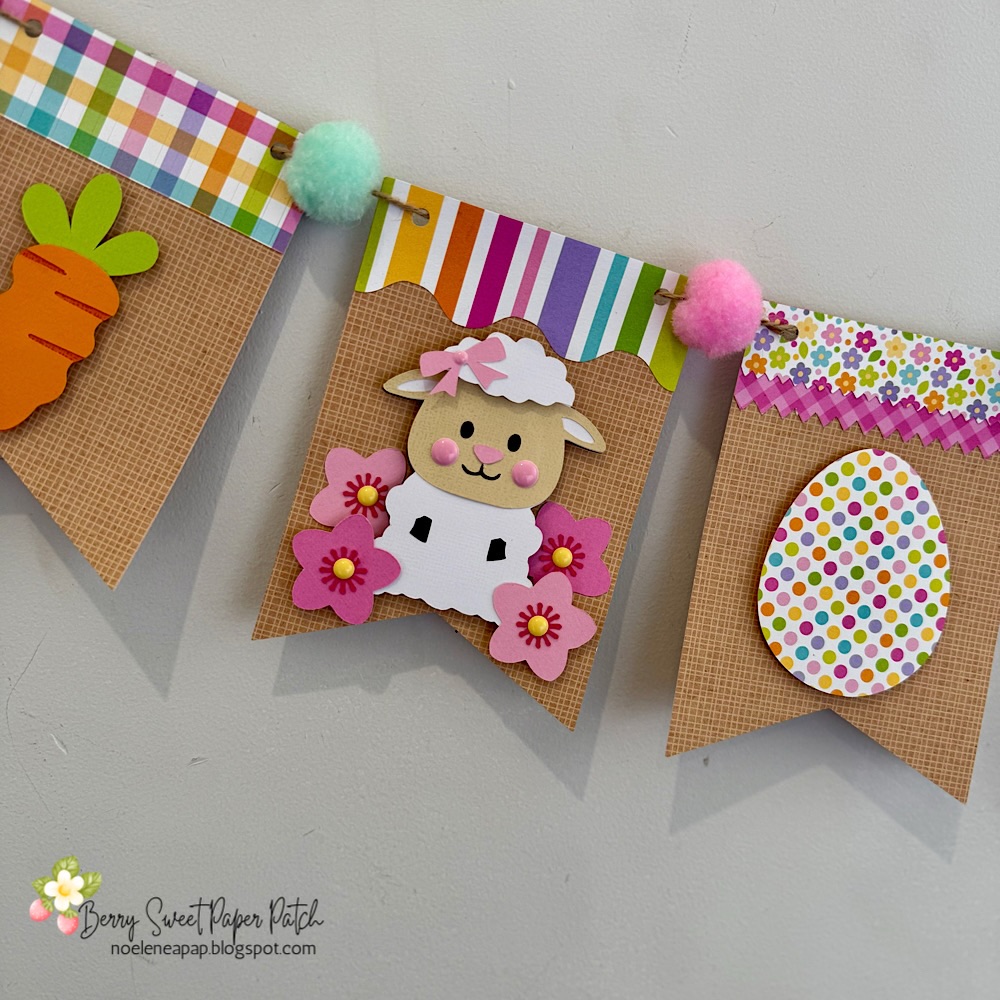
Hello crafty friends. Today I want to share with you how I made this cute Easter banner using 6 Lori Whitlocks Files:

Layered Bunting 2 (Silhouette, SVG)
Easter Purse Topper (Silhouette, SVG)
 Easter Sheep Car Box Card (Silhouette, SVG)
 Easter Bunny Car Box Card (Silhouette, SVG)
 5x7 Easter Bunny Card (Silhouette, SVG)
Easter Basket Chic Box Card (Silhouette, SVG)

I wanted my banner to have a pastel rustic feel. I chose some Doodlebug kraft gingham cardstock for my bunting base. Then some coordinating coloured papers to match. 


To start my project I opened all the files in Silhouette that I wanted to use.  I deleted the parts I didn't need then I copied them onto one page with the bunting.  You will see I have used the similar bunnies from the 5x7 Easter Bunny Card & Easter Bunny Car box card. I did this because the carrots in the box card are whole carrots once you ungroup everything. Also she has more of a body. I omitted her bow & used the floral head piece from the 5x7 card. You can just use the Bunny from the Easter Bunny Car box Card if you wish. I also took the extra step of using the egg from the topper to give the bunny a belly like the one in the 5x7 card. To do this I used the same step below by sizing it onto the bunny.


When you open the Bunting file it will have 3 bunting shapes across the page. I right clicked over all 3 & enlarged by dragging the corner just enough so that all 3 bunting pieces fit across my page. I then coppied all 3 & pasted another row. You can make yours bigger or smaller however you please. I did mine this way as it will give me the most bunting pieces, (6 in total per page), without too much scrap. I cut 9 bunting panels in total. Next I sized my images one by one. To do this I copied a bunting panel to the side of my page. I then placed my image piece inside & enlarged or reduced the size making sure it fit inside. Make sure you place the little panel across the top of the bunting as well as I did in my image below.  Do this step for all your pieces.


Now once you have all the sizes correctly cut out all your pieces & glue together all your image pieces.


Then just place everything onto the panels to see what order you want everything to sit. Once you are happy with it, it helps to take a photo so that you remember where to glue everything.


Now glue the panels onto the bunting base. You will notice that the body on the bunny is a little long. Before I stuck down the bunny I placed her onto the bunting with washi tape, then I turned the bunting over & traced the edge with pencil along the back of the bunny. I then cut along the pencil trace & proceeded to stick the bunny onto the front of the bunting. 


I used foam squares to stick down my image pieces. This gives them a raised look. 


Once you have all the bunting pieces ready the last step is to thread some twine & pastel pom poms through to finish the banner.


You can use as little or as many files as you wish. The possibilities are endless. I just love Lori's files & couldn't resist the temptation. 


I hope I have given you some inspiration today to create an Easter banner! 

Supplies:
Paper: Doodlebug Design - Petite Prints & Hippity Hoppity Collection
SVG File: Lori Whitlock 
Layered Bunting 2 (SilhouetteSVG)
Easter Purse Topper (SilhouetteSVG)
 Easter Sheep Car Box Card (SilhouetteSVG)
 Easter Bunny Car Box Card (SilhouetteSVG)
 5x7 Easter Bunny Card (SilhouetteSVG)
Easter Basket Chic Box Card (SilhouetteSVG)

Accessories: Doodlebug Design Sprinkles

For more inspiration, check out my Instagram!

Thanks for stopping by!

Hugs

Noelene :)  

Tuesday, April 23, 2024

Bunny & Guinea Hoppy Garden

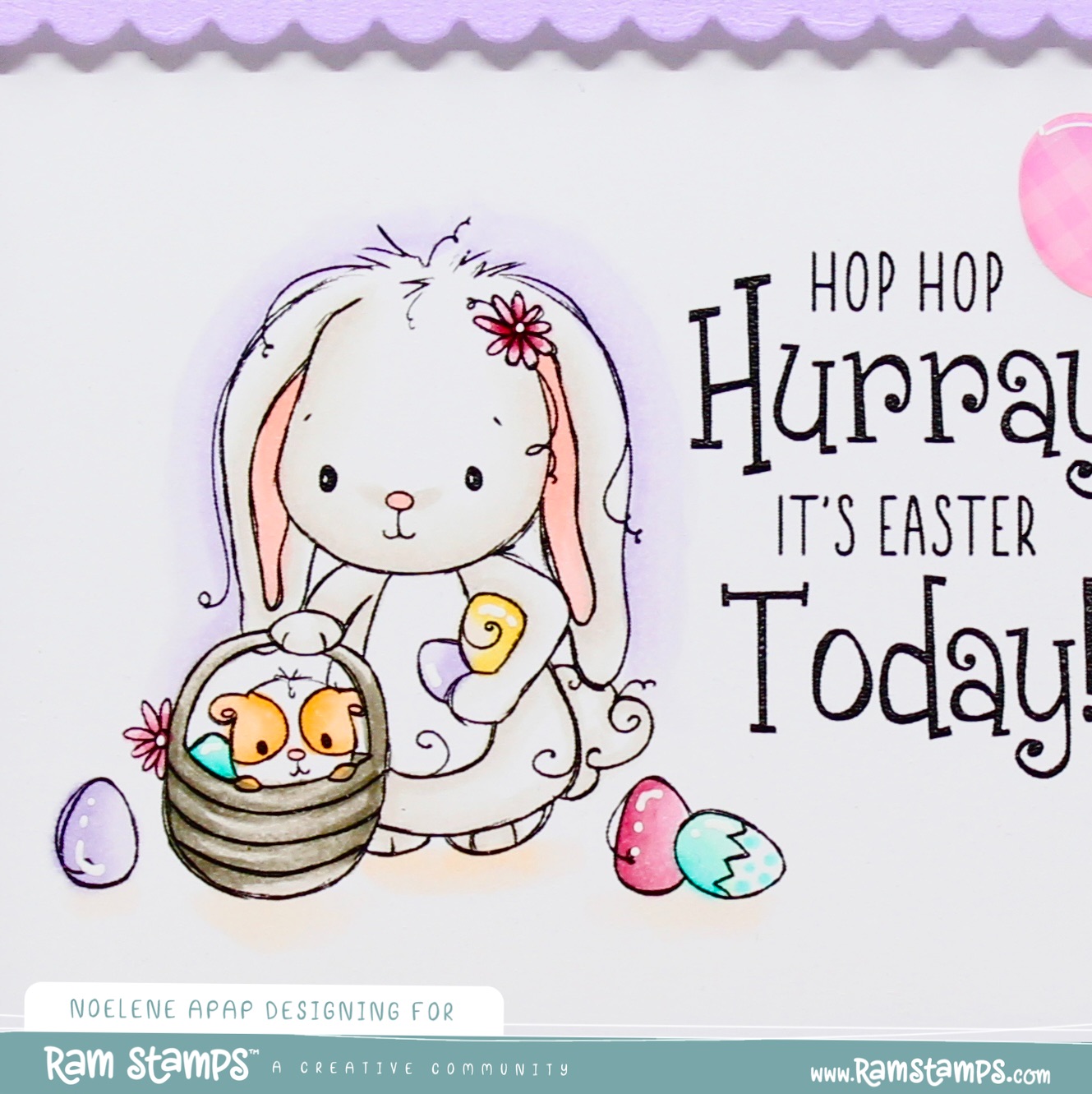
Hello Crafty Friends, I have a card to share with you today using another sweet digital stamp from the Bunny & Guinea collection called Bunny & Guinea Hoppy Garden from  RAM Stamps.  


I embossed a panel then layered it onto a 5x7 base. Once I printed & coloured my image I cut it to size & then adhered this onto the centre of my card base & finished it off by adding some shape sprinkles to embellish.


Copics:
Flowers & Butterflies: Y0000, Y21, YG61, YG63, R32, R30,R81, R83, BV0000, BV00
Bunny & Basket: W0, W2,  R20
Guinea Pig: YR00, YR12


You will find Bunny & Guinea Hoppy Garden  here

Don't forget to check out the other Bunny & Guinea digital stamps here!
  
Want them all? Then just bundle & save here !


Use coupon code NOELENE for 10% off your purchase!


Supplies:
Paper: Doodlebug Design - Hippity Hoppity Collection
Colouring Medium: Copics
Accessories: Spellbinders Flower Frenzy 3D Embossing Folder, Doodlebug Design Shape Sprinkles.

For more inspiration, check out my Instagram!

Thanks for stopping by!

Hugs

Noelene x


Sunday, March 31, 2024

Easter Belly Boxes

 Happy Easter crafty friends. Easter is here & I have some fun Easter Belly Boxes to share with you today.


I have made these Easter Belly Boxes using a SVG files called Belly Box Easter Bunny 2, Belly Box Chick, Belly Box Lamb. I cut the files out using my Silhouette cutting machine then glued all the pieces together. I embossed the wool on the lamb. They were quite simple and easy to make. Lastly I embellished with some cute Stickers & filled with eggs. 


Belly Box Easter Bunny2


Belly Box Chick


Belly Box Lamb


Supplies:
Paper: Doodlebug Design - Hippity Hoppity Collection
SVG File: Lori Whitlock - Belly Box Easter Bunny 2, Belly Box Chick, Belly Box Lamb
Accessories: Doodlebug Design Shape Sprinkles, Cuttlebug D'vine Swirl Embossing Folder.


For more inspiration, check out my Instagram!

Thanks for stopping by!

Hugs

Noelene :)  


Saturday, March 30, 2024

Easter Basket Eggs Box Card

 Hello crafty friends. Easter is almost upon us & today I have a cute 3D Easter card to share with you.


I have made this Easter using an SVG file called Box Card Easter Basket Eggs. I cut out using my Silhouette cutting machine then glued all the pieces together. It was quite simple and easy to make. Lastly I embellished with some cute Easter Stickers. 


Supplies:
Paper: Doodlebug Design - Hippity Hoppity Collection
SVG File: Lori Whitlock - Box Card Easter Basket Eggs
Accessories: Doodlebug Design Shape Sprinkles & Hippity Hoppity Icons.

For more inspiration, check out my Instagram!

Thanks for stopping by!

Hugs

Noelene :)  


Friday, March 15, 2024

Bunny & Guinea Egg Hunt

Hello Crafty Friends, I have an Easter card to share with you today using the sweet Bunny & Guinea Egg Hunt digital stamp from  RAM Stamps.  


I created my card by layering my printed cardstock onto a 5x7 base. Once I printed & coloured my image I cut it to size & adhered it underneath my die cut frame. I then adhered this onto the centre of my card base & finished off by adding some shape sprinkles to embellish.


Copics:
Eggs: BG10, BG11, BG13, R81, R83, BV0000, BV00
Bunny & Basket: W0, W2, W4, W6, R20
Guinea Pig: YR00, YR02


You will find Bunny & Guinea Egg Hunt here

Don't forget to check out the other Bunny & Guinea digital stamps here!
  
Want them all? Then just bundle & save here !


Use coupon code NOELENE for 10% off your purchase!


Supplies:
Paper: Doodlebug Design - Hippity Hoppity Collection
Colouring Medium: Copics
Accessories: Pink Fresh Studio Stiched Scallop Rectangles Die, Doodlebug Design Shape Sprinkles.

For more inspiration, check out my Instagram!

Thanks for stopping by!

Hugs

Noelene :)  


Monday, February 26, 2024

Bunny's Easter Egg

 Hello Crafty Friends, today I am sharing another Easter card with another image from this month's new release over at Rachelle Anne Miller Creative Studios called "Easter Fun". 

For my card I am using the image called Bunny's Easter Egg.


I printed my image on some Xpress It Blending Paper & masked it with the same printed image that I fussy cut. With my mask in place I stamped around the image using some different paintbrush stroke stamps in different pastel colours & added some splatters of diluted Copic Opaque White. Then I removed my mask & coloured my image with Copics.  I then stamped & cut my sentiments & glued them into place. I added some enamel dots to embellish. Lastly I layered my card onto a 5x7 base.


Copics:
Bunny & Brushes: E00, E21, E23, E25
Blue: BG000, BG01, BG02
Green: YG11, YG13, YG17
Yellow: Y02, Y04, Y08 
Purple: V01, V04, V05
Pink: RV02, RV06
Bucket: C2, C4, C6


You will find "Bunny's Easter Egghere

Don't forget to check out the other new digital stamps called "Bunny's Bike", "Stacked Chicks" & "Easter Blessings"!  
Want them all? Then just bundle & save here !


You will find the matching digital pattern paper pack Easter Fun here!


Use coupon code NOELENE for 10% off your purchase!


Supplies:
Sentiment Stamp: Doodlebug Design - Happy Birthday
Brushstroke Stamps: Stampin Up - Work of Art
Paper: AC Cardstock - Lipgloss
Colouring Medium: Copics
Ink: Taylored Expression - Jelly Donut, Sprinkles, Milkshake, Lemon Merangue, Mint Julep
SVG File: Printable Cuttable Creatables - Happy Easter Title
Accessories: Doodlebug Design Sprinkles.


For more inspiration, check out my Instagram!

Thanks for stopping by!

Hugs

Noelene x